The canvas is a small, fixed set of rules repeated across every project. Once you know them, every node behaves the same way regardless of which one it is.
Nodes and edges
A node is one step in the pipeline. An edge is the arrow connecting two nodes — it means "the thing on the left feeds the thing on the right." You can't connect anything you like to anything else: each node type only accepts certain inputs, and the canvas rejects (or reverts, instantly) any connection that doesn't make sense.
| This node... | ...only accepts a connection from |
|---|---|
| Variables | Dataset |
| Period | Variables |
| EDA / a model (Robyn, Meridian, PyMC) | Period, or Variables directly (skipping Period uses the full date range) |
| Allocator | any model — Robyn, Meridian, or PyMC (you can connect and configure it before training; it just won't start until its model has finished) |
| Benchmark | any model or any allocator, and it accepts more than one |
| Dataset, Note | nothing — they don't take an input |
Only Benchmark accepts multiple incoming connections; every other node that accepts input takes exactly one. That's what lets a Benchmark line up several models (and their allocators) side by side for comparison.
Allocator nodes accept any engine on purpose. When you drop a bare "allocator" from the sidebar it's generic until you connect it — only then does it lock to Robyn, Meridian, or PyMC, based on whatever it's wired to.
Node status
Every node that actually runs (a model, an allocator; EDA runs synchronously and finishes almost immediately) moves through the same five states:
| The card says... | Meaning |
|---|---|
| Not configured (plus a hint about what to connect) | Dropped on the canvas but not wired up or configured yet (internally: pending). |
| ready to run | Set up and ready — connected, its modal filled in, but not started (internally: configured). |
| running… | Running. Click the node and choose View progress & logs to open the progress drawer. |
| completed | Finished successfully — results are ready to view. |
| error | Failed. Click the node and choose View progress & logs to see the log and find out why. |
Dataset, Variables, and Period don't "run" — they show configured once they're filled in, since there's nothing to wait on.
Running and canceling
The canvas doesn't dispatch one node at a time — clicking Run in the Workflow section of the left sidebar starts every ready model and EDA node at once (and any allocator whose model has already finished). If your plan limits how many models can run at the same time, extra ones simply wait their turn and show as Queued; they start automatically as slots free up.
While something is in flight, that same button reads Cancel run — click it and confirm with Cancel models (or back out with Keep running) to stop everything in flight. A canceled node goes back to ready to run — canceling never leaves partial or misleading results behind, so there's nothing to view until you run it again.
Watching progress
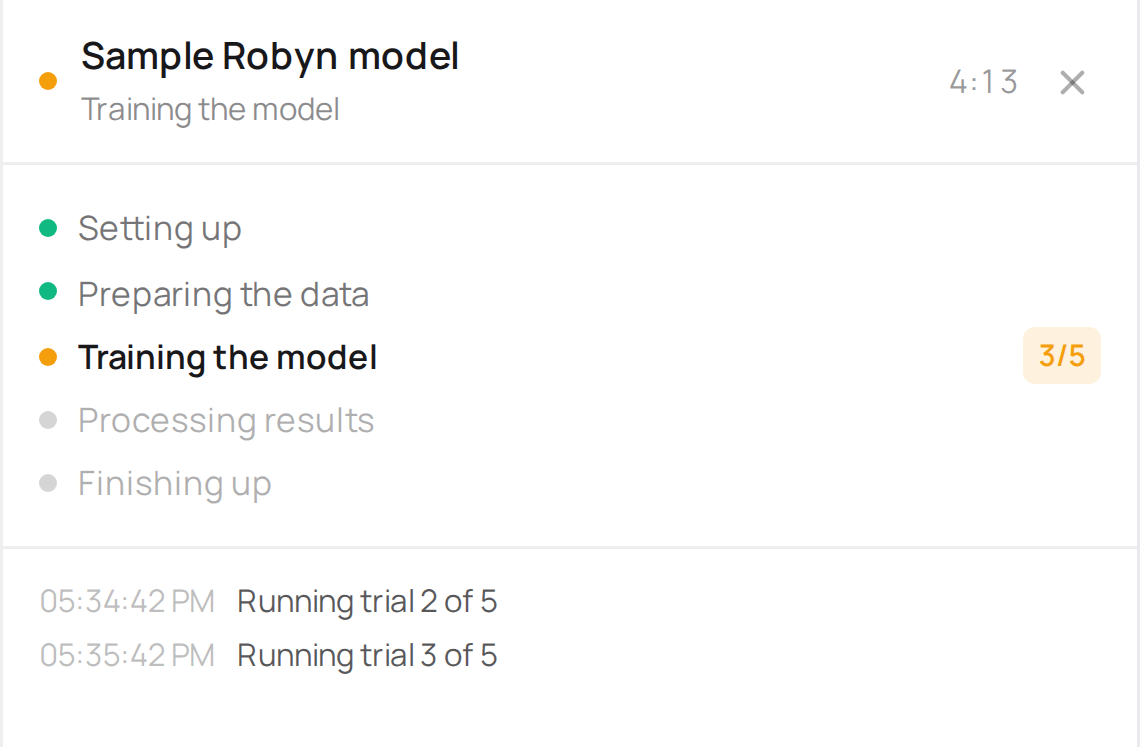
Click a running node and choose View progress & logs to open the log drawer. You'll see the current stage, a live count of real work where the engine reports one (Robyn reports its trials; Meridian and PyMC don't report a count, so for them you see the stage and how long it's been going), and elapsed time — deliberately never an ETA or a percentage. How long a run takes depends entirely on the settings you chose, so any fixed estimate would just be a guess dressed up as a number.
"Configure again" — what it actually discards
There's no "edit" button for a model or an allocator once it's connected — only Configure again. That's intentional: changing a model's settings means retraining it, so "editing" it in place would be misleading. Configure again discards the node's results and everything wired downstream of it, then leaves it pending so you can fill in the modal again. The wiring itself stays put — you're not rebuilding the canvas, just redoing what's inside one box and whatever depended on it.
A few nodes behave a little differently:
- Variables is the one place you do edit in place — since datasets and mappings can be shared across more than one flow on the same canvas, the mapping itself isn't recreated. Its results aren't spared, though: if anything was trained on the mapping, saving the edit also discards everything downstream — a confirmation tells you how many models that is and asks you to Save & discard results before anything changes.
- Period, because changing dates always implies retraining, works like a reset: discard and reopen the modal pre-filled with the old dates so you can adjust and resubmit in one step.
- Changing which Pareto solution a Robyn model uses — the Change solution action on the Robyn node, or the solution table on its detail page — discards every allocator connected to that model (not the model itself): each allocator optimizes against the response curves of one specific solution, so it stops being valid the moment you pick a different one.
Note nodes
A Note is the one node that isn't part of the pipeline — it doesn't connect to anything. Use it to leave context on the canvas itself: why a period was chosen, what a client asked for, a reminder for next quarter.