Robyn is Meta's open-source MMM package. It fits a ridge-regression model and searches for the best adstock and saturation parameters using an evolutionary optimizer — which means a single Robyn run actually produces many candidate models (a "Pareto front"), and you pick one to work with after training finishes. It's the fastest of the three engines to get a first result from.
Connecting it
Drag a Robyn node off Period (or directly off Variables).
Basic fields
| Field | What it controls |
|---|---|
| Name | Optional label for the model. |
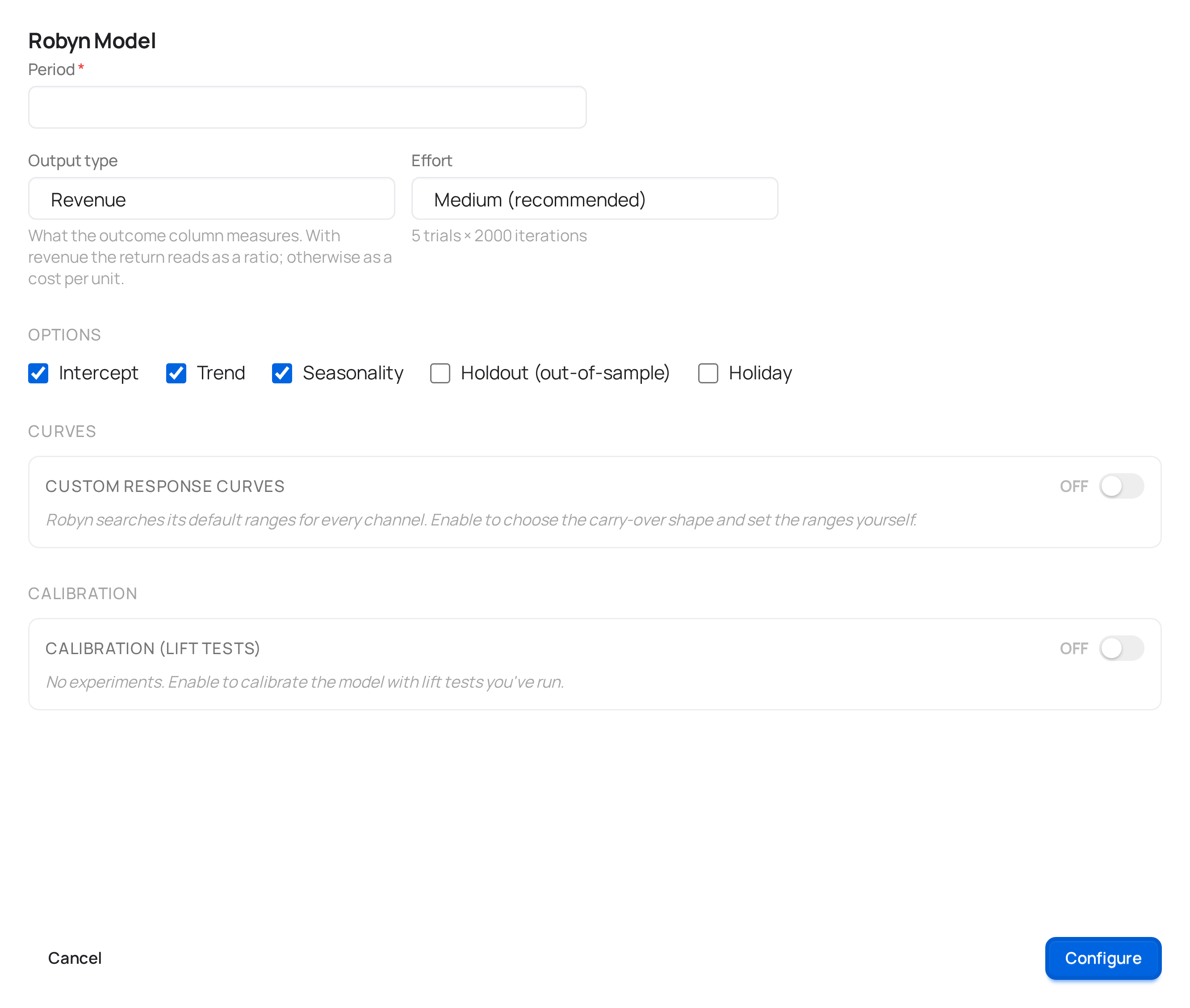
| Output type | Whether your KPI column is revenue-like or a conversion count — affects how contributions and ROI are scaled. |
| Adstock | The decay shape for how a channel's effect carries over after spend stops. Geometric (default) is a single-parameter exponential decay and the standard starting point. |
Model components
These are toggles for whether Robyn should model each effect at all:
| Field | Default | What it does |
|---|---|---|
| Intercept | On | Includes a baseline level of the outcome not explained by any channel. Turning it off forces the model to explain everything through the channels you've mapped — rarely what you want. |
| Trend | On | Lets the model account for a long-run upward or downward drift in your outcome that isn't caused by any channel. |
| Seasonality | On | Accounts for the recurring yearly seasonal pattern in your outcome. Day-of-week effects are a separate component that this toggle doesn't include (it's off by default and not exposed in the modal). |
| Holiday | Off | Adds Robyn's built-in holiday calendar as another baseline factor. Ticking it reveals a Country selector — ten countries: United States, United Kingdom, Canada, Australia, Germany, France, Spain, Italy, Netherlands, Belgium — and the calendar used is that country's. |
Validation and search budget
| Field | Default | What it controls |
|---|---|---|
| Out-of-sample validation | Off | Holds out the final stretch of your date range and scores the model on data it didn't train on, instead of only on training-set fit. Turn this on if you want a more honest read on how the model would perform on new data. |
| Train size | 80% | Only used when validation is on — a four-option selector (70% / 75% / 80% / 85%) for the fraction of the period used for training. Robyn splits the remainder between validation and test, taken from the end of the range. |
| Effort | Medium | How hard the evolutionary optimizer searches. Low — a first look runs 1,000 iterations × 2 trials; Medium (recommended) runs 2,000 × 5; High — slower, tighter estimates runs 5,000 × 5. Iterations are how many parameter combinations each trial tries; trials are independent optimization runs, so more of them reduce the chance the search gets stuck in a bad local optimum. |
There's no time estimate shown anywhere in meryn for a run — it depends directly on the effort level and the size of your dataset, so any fixed number would be a guess. The progress drawer shows live trial counts instead; see The canvas for how to read it.
Hyperparameter ranges
By default, Robyn searches sensible ranges for each channel's adstock decay and saturation shape automatically. If you know a channel's real-world decay behavior (a TV campaign that lingers for weeks vs. a search ad that doesn't), turn on Custom hyperparameters to override the search range per channel instead of letting Robyn guess from scratch — the sliders are pre-filled with the defaults so you're narrowing, not starting blind.
Calibration (optional)
If you have real lift-test results for one or more channels — an incrementality test, a geo holdout, anything that gives you an actual measured effect — you can feed them in to anchor the model instead of relying purely on the spend/outcome correlation. Add a row per test: channel, date range, spend during that window, the measured lift, a Confidence (0–1) that sets how much weight the test carries against the model's own fit, and a Scope — whether the measured lift is the immediate effect the experiment isolated (the usual case) or a total effect that already includes carry-over (only when the number comes from another MMM). meryn checks each row live against your actual spend data and shows you the implied ROI and any warnings (e.g. tested spend that doesn't match what the dataset shows for that window) before you save.
Calibration is optional and most models never need it — it matters most when you have a channel whose spend barely varies over your date range, which makes it hard for the model to isolate that channel's effect from correlation alone.
After training
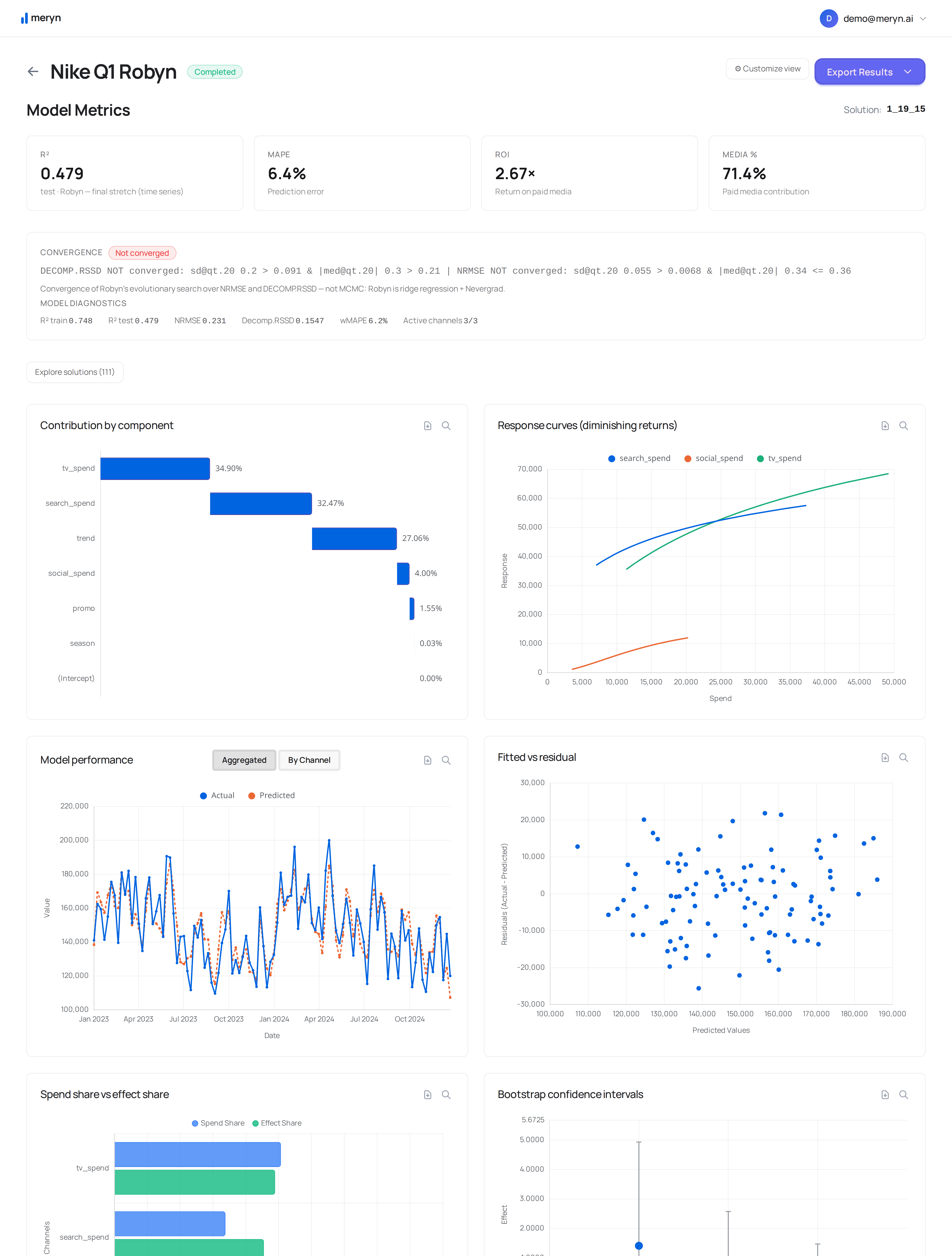
A Robyn run produces several candidate solutions on its Pareto front, not one. meryn picks a default automatically (the same selection logic the framework itself recommends), but you can open the model and choose a different one from the Pareto chart if a different tradeoff between fit and model simplicity suits your case better. Changing the solution discards every allocator connected to this model — an allocator optimizes against one specific solution's response curves, so it stops describing the model correctly the moment you pick a different one.
What connects here
Upstream: Period or Variables. Downstream: Budget allocator or Benchmark.
What you get back
Fit quality, contributions by channel, response curves, ROI, and the Pareto front of candidate solutions — all on the model's results page. Each candidate solution also comes with a downloadable one-pager PDF, generated by Meta's own framework rather than by meryn, so it's auditable against Robyn itself: