A Plan answers the question an allocator can't: you have a budget for a stretch of time that hasn't happened yet — how do you split it, and what should you expect?
The difference matters. A budget allocator works inside the window the model was trained on: it tells you how you should have split what you already spent. A Plan looks forward. Its window starts after the last date the model saw, it always asks for a budget, and what it gives back is a calendar: how much goes into each channel, period by period.
Connecting it
Drag a Plan off any trained model — Robyn, Meridian, or PyMC. Like an allocator, you can wire it up and configure it while the model is still running; it starts on its own once the model completes.
The planning window
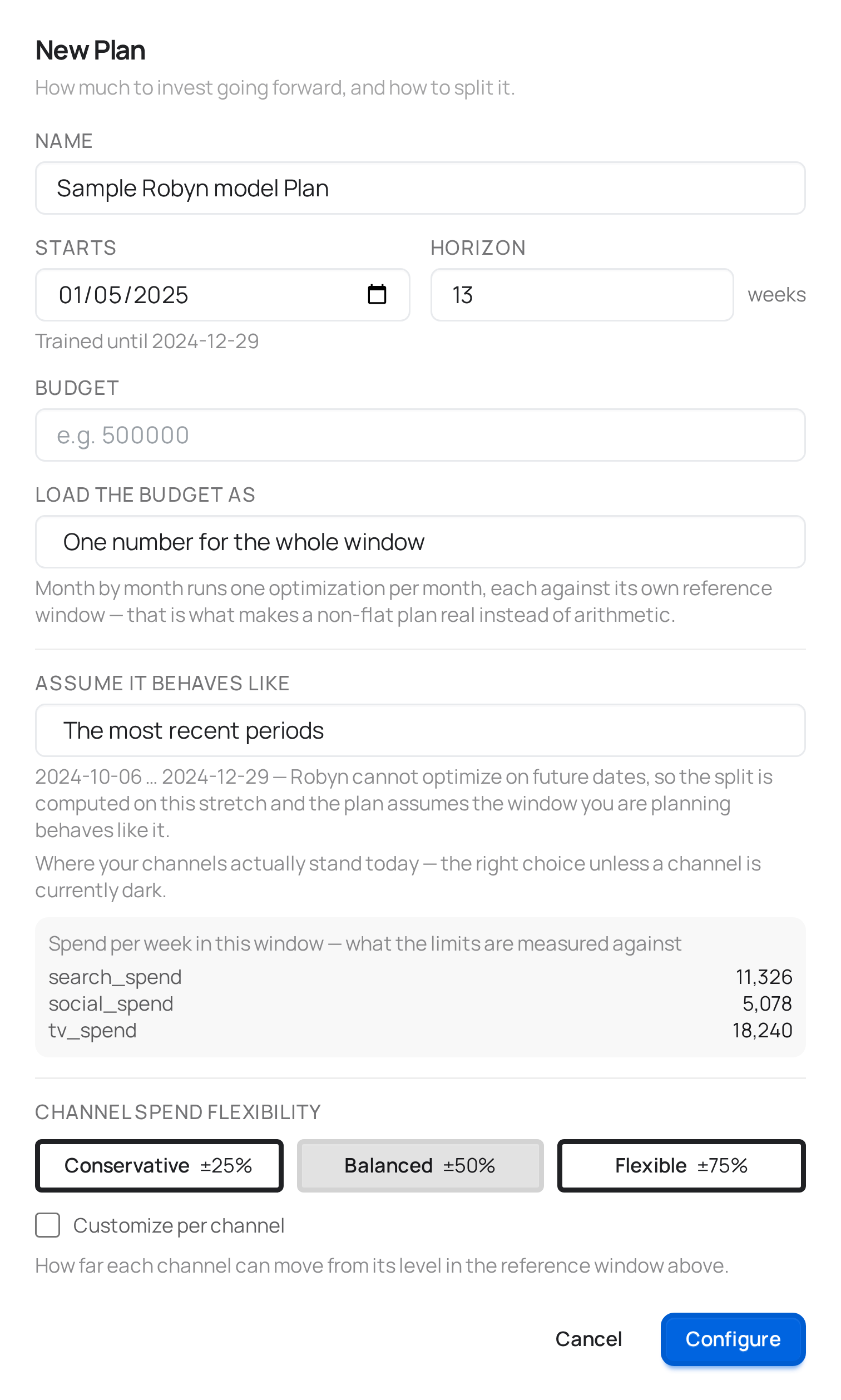
Starts defaults to the period right after the last one the model was trained on, and can't be earlier than that — a window inside the trained range is an allocator, not a plan, and meryn will say so.
Horizon is how many periods you're planning, in whatever frequency your data is: 13 weeks, 3 months, 90 days. The modal shows the unit so there's no guessing.
Budget
A Plan always needs a budget. This is the one place meryn won't fall back to historical spend, because deciding how much to invest is the question.
You load it one of two ways:
| One number for the whole window | The simplest case. The budget is spread across the window proportionally to each stretch's length. |
| Month by month | Opens one row per month, with its real date range and period count. |
Month by month is not just presentation. Each month becomes its own optimization, against its own reference window — March is planned against March, not against a quarterly average. That is what makes a non-flat plan a real result instead of arithmetic on top of a flat one.
One detail worth reading on that screen: the months show their actual date ranges, not just the month name. With weekly data, "Jan 2027" might cover Jan 4–25 — four weeks — while March covers five. meryn counts the periods from your own date index, so the budget you type for a month lands on exactly the weeks shown next to it.
The reference window
A stretch of history the plan leans on. What it's used for is not the same in every engine, and the modal says which — the label itself changes:
| Engine | What this window is |
|---|---|
| PyMC | Only the yardstick for the channel limits. The optimization itself runs on your future dates. |
| Meridian | The yardstick for the limits, and where the media pattern for the future dates is taken from. The optimization runs on your future dates. |
| Robyn | The window that is actually optimized. Robyn cannot take future dates at all, so the plan assumes the stretch you are planning behaves like this one. |
Why two of the three need a yardstick at all: "±50%" has to be ±50% of something, and in the future there is no current spend to anchor to — that spend is the thing being decided.
Which stretch, you pick:
| Option | When it's the right one |
|---|---|
| The most recent periods (default) | Almost always. It's where your channels actually stand today — which is the point, since the limits are multiples of that level. |
| Same period last year | When you plan to switch a channel back on that is dark right now. |
Why the recent window is the default, and this is the part worth understanding: the limits are multiples of the spend in this window. If a channel has been ramping up, anchoring to last year centers its band on a level it has already left — with ±50%, the plan's ceiling can land below what you spend today, and the recommendation walks the channel backwards.
And note what last year does not buy you: seasonality of the response. The model already knows March behaves like March — that lives in the baseline, which the optimizer doesn't touch — and on PyMC and Meridian the optimization runs on your real future dates. What the window contributes is a spend level, nothing else. If you want a seasonal plan, the lever is the monthly breakdown, which optimizes each month separately.
A channel with no spend in the window you pick gets locked at zero, because
its limits are 0 × anything. That's the case where last year earns its keep:
planning Q4 anchored to Q3, with TV dark since January, would quietly drop TV
from the plan. The modal shows the spend per channel for the window you picked
and warns you by name when one of them is at zero.
If a reference window would fall outside what the model was trained on, meryn doesn't quietly shrink it — the option simply isn't offered.
Channel spend flexibility
How far each channel can move from its level in the reference window. It's the same control as the allocator's, with the same presets and the same per-channel override — see its table. What changes is only what the percentage is measured against: here, the reference window you just picked.
If your budget is far outside what those limits allow, meryn tells you before running anything. Tripling next quarter's spend with a ±50% band has no valid answer: no split satisfies both. The message names the budget, the range the limits allow, and which of the two to change.
Future assumptions (PyMC only)
Where the model has control variables — price, promotions, a competitive index — PyMC needs to know what happens to each of them over the planned window, because it projects the outcome and not just the split. Each one takes an assumption: hold it at the reference level, zero it out, or pin a number.
This section only appears on PyMC plans, and the reason is in the next part.
What each engine can tell you
All three engines answer the same question about how to split the budget — the response curves are structural, so they hold going forward. Where they differ is what they can say about the outcome, and the difference comes from the frameworks themselves, not from meryn:
| Engine | Split | Expected outcome |
|---|---|---|
| PyMC | ✓ | ✓ — projected for the planned dates, with a credible band |
| Meridian | ✓ | ✗ — its analyzer refuses to project an outcome for dates outside the training window |
| Robyn | ✓ | ✗ — its objective has no baseline, so there is no total to project |
For Meridian and Robyn the plan reports incremental outcome from media and its ROI. That's the honest number those engines produce; a total would be invented. The plan page says which one you're looking at.
Running it
Saving a Plan leaves it configured, same as a model or an allocator — click Run. It doesn't retrain anything, so it's a light job; a plan with a monthly breakdown runs one optimization per month, so a twelve-month plan takes longer than a single-window one.
Reading the result
Three things on that page, in the order they matter:
- The calendar — how much goes into each channel in each period, grouped by the stretches that were optimized separately. This is the thing you execute.
- The expected outcome (PyMC only) — the line is what the model expects, the shaded band is a credible interval. It says where the model thinks the outcome falls given what it learned; it is not a margin of error.
- What this plan assumes — the reference window with its dates, what was assumed about each control, and a note on what this engine can and cannot project. A plan is a number about the future: what makes it defensible is being able to read where it came from.
What connects here
Upstream: a Robyn, Meridian, or PyMC model.
A Plan is a leaf — it doesn't feed the Benchmark. Comparing plans across engines would mean comparing numbers that aren't the same measure, which is exactly what the Benchmark exists to avoid.