A budget allocator takes a trained model's response curves — how much each extra dollar on a channel is worth, at whatever spend level you're currently at — and works out a spend split that does better against a goal you choose. It doesn't retrain anything; it optimizes against what the model already learned.
It looks backwards. An allocator works inside the window the model was trained on: it tells you how you should have split what you already spent. If what you need is the other question — "I have a budget for next quarter, how do I invest it?" — that's a Plan.
Connecting it
Drag an allocator off any model — Robyn, Meridian, or PyMC. You don't have to wait for training: connect and configure it while the model is still running (or before it runs at all), and the allocator starts on its own once the model completes. An allocator dropped from the sidebar is generic until it's connected; wiring it to a specific engine's model is what decides which one it becomes.
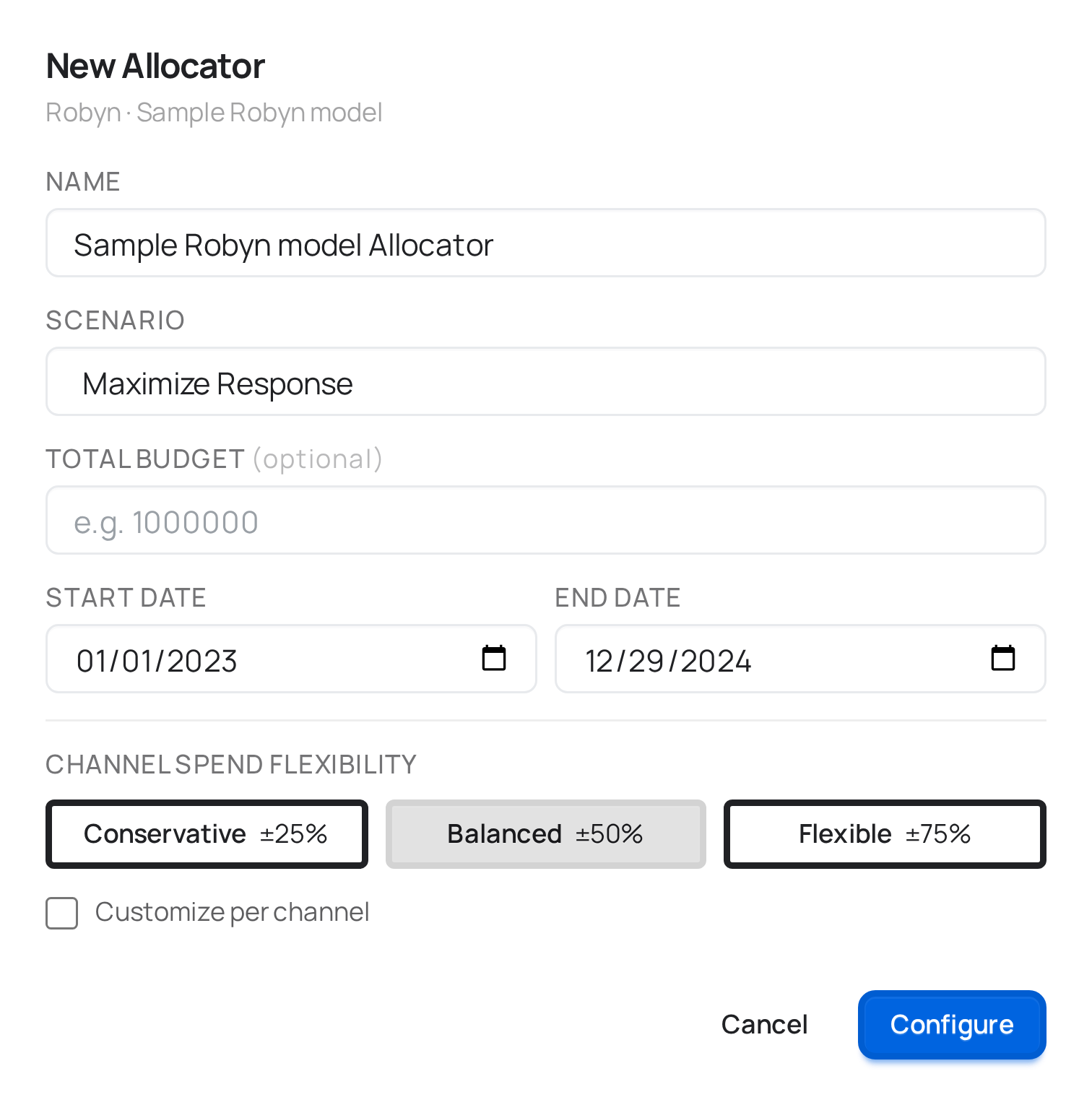
The modal pulls in the model's name, effective date range, and list of paid channels automatically — nothing here is retyped from the model.
Scenario
Which scenarios are available depends on the engine the allocator is connected to:
| Engine | Scenario | What it optimizes |
|---|---|---|
| Robyn | Maximize response | Get the most out of a budget you specify. |
| Robyn | Target efficiency | Hit a target ROAS or CPA, spending whatever it takes within the channels' bounds. |
| Meridian | Fixed budget | Maximize response for a budget you specify. |
| Meridian | Flexible budget (target ROI) | Hit a target ROI on the total spend, spending as much or as little as needed. |
| Meridian | Flexible budget (target marginal ROI) | Keep spending until the last dollar invested returns the marginal ROI you set. |
| PyMC | Fixed budget | Maximize response for a budget you specify. |
| PyMC | Target response | Find the minimum budget that reaches a response target you set. |
Meridian's two flexible-budget scenarios are mutually exclusive — a requirement of Meridian itself, not of meryn: a run optimizes against total ROI or against marginal ROI, never both.
Target-style scenarios need a Target value — target ROAS/CPA for Robyn, target ROI or target marginal ROI for Meridian, target response for PyMC. meryn won't let you save one of these without a number filled in.
Budget-style scenarios don't strictly need an amount. If you leave Total budget blank, the allocator falls back to the model's historical spend over the training period as the budget to reallocate — all three engines do this, Robyn included.
Date range
Start date / End date default to the model's own training window — narrow them if you want the allocator to reason about a shorter period (a single upcoming campaign window, for instance) rather than the full range the model was trained on.
Channel Spend Flexibility
How far the optimizer is allowed to move each channel from its current spend, as a percentage band:
| Preset | Range |
|---|---|
| Conservative | ±25% |
| Balanced (default) | ±50% |
| Flexible | ±75% |
| Customize per channel | Set your own low/high bound for each channel individually — useful when you have a contractual minimum on one channel or a hard cap on another. |
A tighter band gives you a more realistic near-term recommendation; a wider one shows what the model thinks the ceiling looks like if you're willing to move budget more aggressively.
Optimizing by market
On a model trained with markets, the modal adds a checkbox — and it means something different per engine, which is why the label changes:
- PyMC — "Optimize across markets": one joint optimization over every market × channel cell. The per-market rows in the result sum to the total budget — it's a split of one budget.
- Meridian — "Optimize within each market": N independent optimizations, one per market, each against that market's own response curves. The per-market rows do not sum to the national total — each answers "what's best inside this market?", not "how do I split one budget".
Running it
Saving an allocator leaves it configured, same as a freshly-configured model — it doesn't start automatically. Click Run the same way you would for a model. It's a much lighter job than training, so it typically finishes in well under a minute.
What connects here
Upstream: a Robyn, Meridian, or PyMC model. Downstream: Benchmark.
The forward-looking sibling of this node is Plan.