Meridian is Google's Bayesian MMM package. Instead of searching for one best answer the way Robyn does, it samples a full posterior distribution over every parameter — which is why its results come with credible intervals, not just point estimates, and why a run takes longer: it's running MCMC (Markov-chain Monte Carlo) sampling, not an optimizer search.
Connecting it
Drag a Meridian node off Period (or directly off Variables).
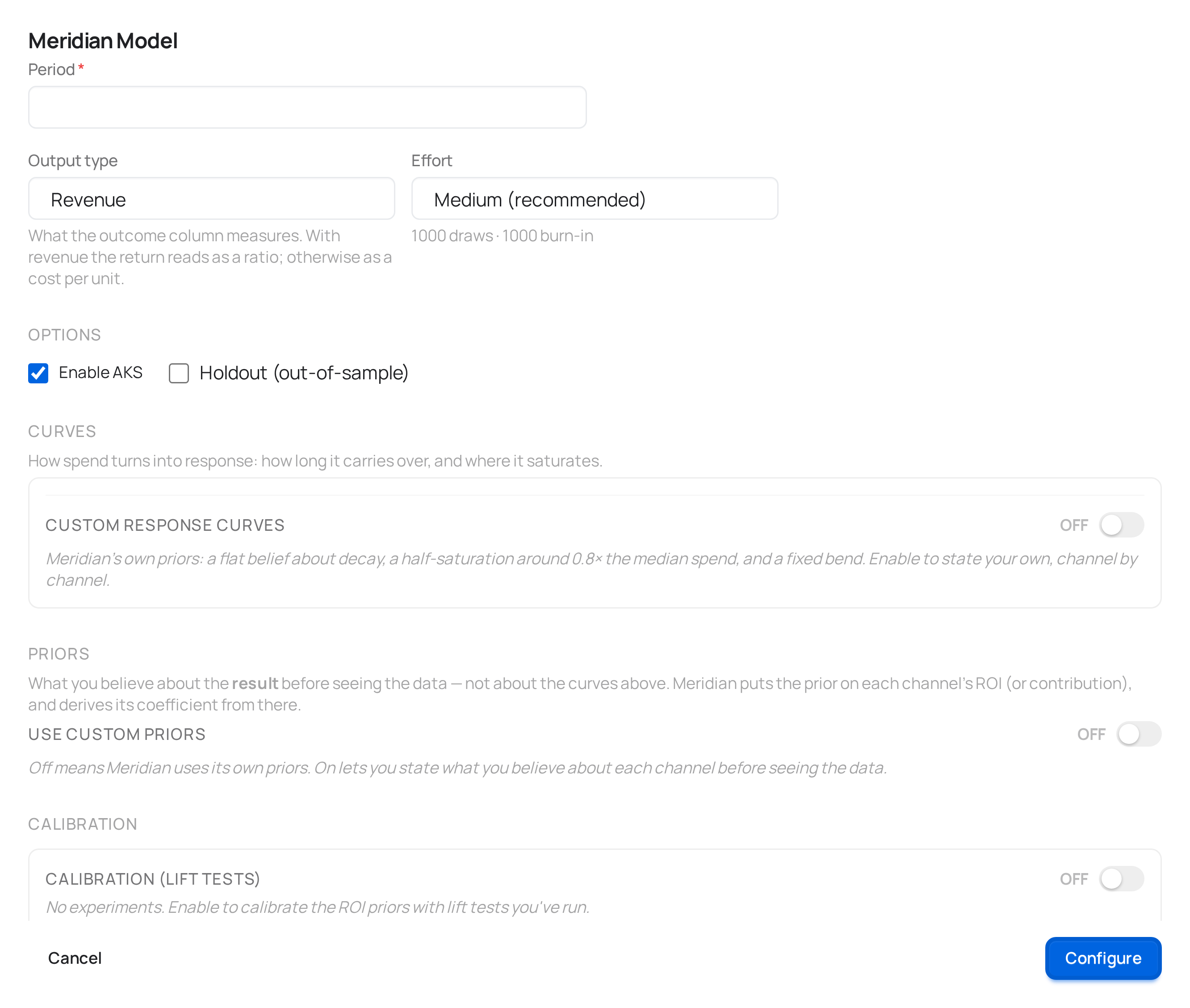
Basic fields
| Field | What it controls |
|---|---|
| Name | Optional label for the model. |
| Output type | Revenue-like or a conversion count. |
Model structure
| Field | Default | What it controls |
|---|---|---|
| Knots | 2 (range 1–10) | How many points Meridian uses to fit the underlying time trend. More knots let the baseline flex more over time; too many can start fitting noise instead of trend. Ignored if Automatic Knot Selection is on. |
| Automatic Knot Selection | Off | Lets Meridian choose the knot count itself instead of using the fixed value above. |
| Max lag | 8 (range 1–52) | The longest carryover window Meridian will consider for a channel's effect — in the same time units as your data (e.g. weeks). Raise this if you have a channel you expect to have a long tail (broadcast TV, brand campaigns). |
| Carry-over | Geometric | The decay shape for how a channel's effect lingers after spend stops: Geometric — fixed rate (a single decay rate, the standard starting point) or Binomial — flexible (lets the decay shape vary more freely). |
| Diminishing returns | Hill | The saturation shape for how a channel's effect flattens as spend grows: Hill — diminishing returns (the standard curve) or None — linear response. |
| Effort | Medium | How deeply the MCMC sampler runs: Low — a first look, Medium (recommended), or High — slower, tighter estimates. Higher effort raises the sampler's adapt, burn-in and kept-draw counts, which tightens the credible intervals and gives the convergence diagnostics more to work with. |
Sampling always runs two independent chains — that's fixed, not a field. What you control is how deeply each chain samples, via Effort.
Priors
| Field | Options | What it controls |
|---|---|---|
| Prior strategy | Meridian defaults / Custom global / Custom per-channel | Whether to use Meridian's built-in default priors, override them with one set of assumptions applied to every channel, or set assumptions per channel individually. |
When you choose a custom strategy, three more choices appear:
- Media prior type — express your belief about paid channels as ROI, Marginal ROI, contribution, or a raw coefficient. ROI is the most intuitive starting point if you have a rough sense of what a channel returns.
- Organic media prior type / Non-media prior type — the same idea for organic and non-media (contextual) covariates, expressed as contribution or coefficient (ROI doesn't apply to a column you don't spend on).
- A distribution editor to set the actual parameters, either once for all channels or per channel, depending on which custom strategy you picked.
If you don't have a strong prior belief, leave this on Meridian defaults — it's not a placeholder, it's Meridian's own recommended starting point.
Calibration (optional)
Same lift-test editor as Robyn and PyMC: add a channel, a date range, the spend during that window and the measured lift, with each row checked live against your actual spend data. What Meridian does with it is different, because the framework has no lift-test API: meryn compiles each experiment into a ROI prior — a TruncatedNormal centered on the ROI the test measured for that channel. Channels without an experiment keep the framework's default prior. Two consequences: it's one experiment per channel (there's no way to feed Meridian several for the same one), and with experiments loaded the Prior strategy stays on Meridian defaults — a calibrated prior and a custom prior would be two competing answers for the same parameter.
Holdout validation
| Field | Default | What it controls |
|---|---|---|
| Holdout validation | Off | Scores the model on data it didn't train on. |
| Holdout fraction | 10% / 20% / 25% | How much of the data to hold out. Meridian's holdout is scattered — individual geo × time cells spread across the whole period, balanced automatically — not a single final block of dates the way Robyn's is. Two models with the same holdout fraction aren't being tested on the same slice of data, so their validation scores aren't directly comparable across engines. |
What connects here
Upstream: Period or Variables. Downstream: Budget allocator or Benchmark.
What you get back
Fit quality with credible intervals, contributions by channel, response curves and ROI on the model's results page — plus Meridian's own two-page HTML summary, generated by Google's Summarizer rather than by meryn, so it's auditable against the framework itself.