The Variables node is the translation layer between your raw CSV and every model. Nothing about your data is assumed — you tell meryn, column by column, what role each one plays.
Connecting it
Drag a Variables node off a Dataset. The modal lists every column from the file and asks you to assign each one a role from a dropdown.
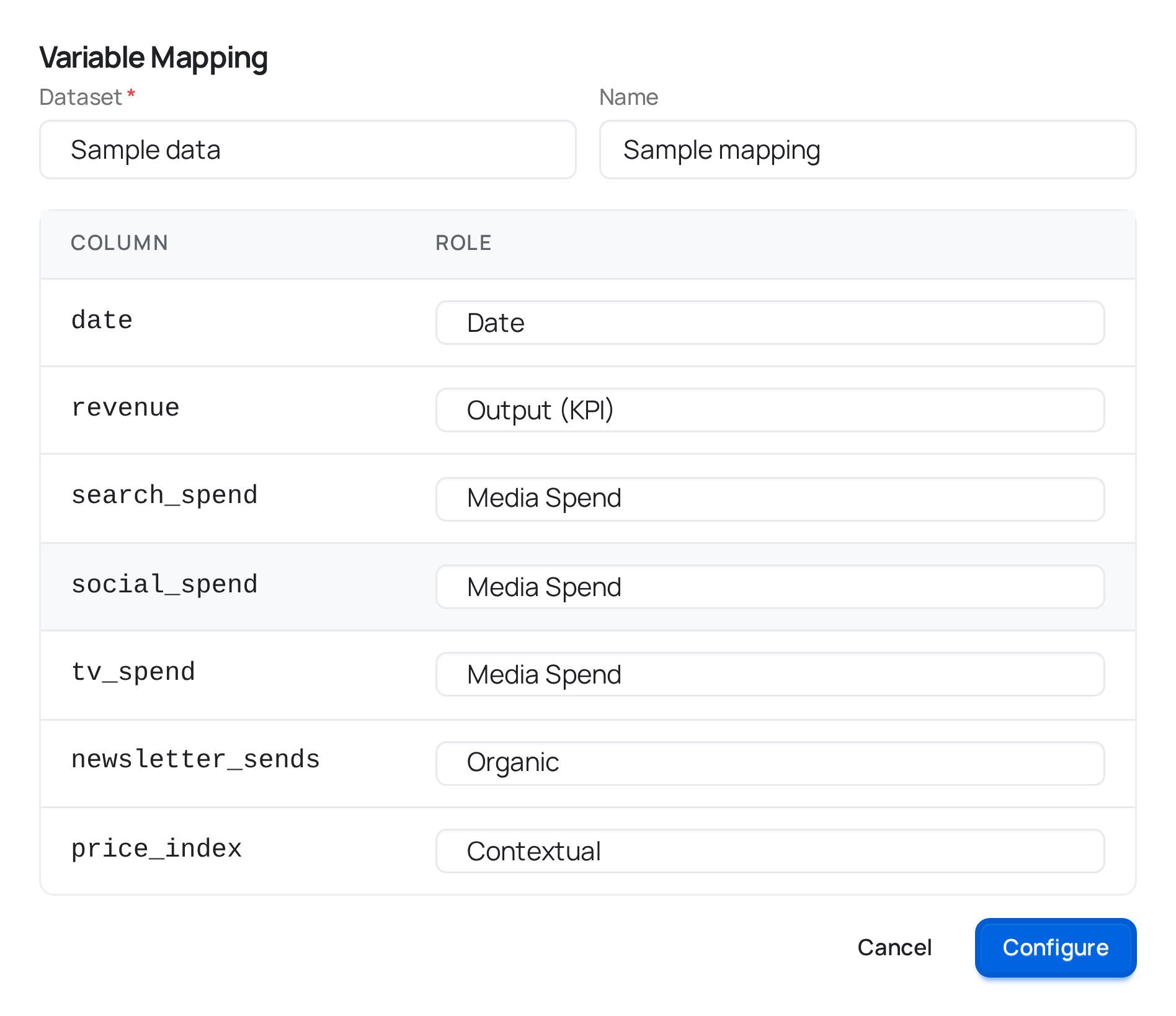
Column roles
| Role | What it means |
|---|---|
| Date | The time column. Assign it to exactly one column. |
| Output (KPI) | What you're modeling — revenue, conversions, whatever the model should explain. Assign it to exactly one column. |
| Paid Media | A channel you spend on — TV, radio, search, social, display, out-of-home. Spend — not impressions or clicks. meryn reads the medium from the column name (a column called tv_spend gets TV-like carryover ranges), so there's nothing else to classify. |
| Organic | Something that drives outcomes without direct spend — organic search, email to an owned list, PR. |
| Contextual | Anything else that affects the outcome but isn't media at all — price, promotions, weather, seasonality drivers you already have as a column. Robyn and PyMC treat this as a plain covariate; Meridian calls the same idea "non-media." |
| Controls | A covariate the model should adjust for statistically without treating it as a channel to attribute contribution to. All three engines use it. |
| Geo (Meridian and PyMC) | The market column of a by-market dataset. |
| Population (Meridian) | Population per market, which Meridian uses to put markets of different sizes on the same scale. |
| (blank / "— skip —") | Excludes the column entirely. Use this for IDs, notes, or anything not relevant to the model. |
Organic becomes an ordinary control column for PyMC — that engine doesn't have a separate concept of "organic media"; Robyn and Meridian both do, and keep Organic apart from Contextual. That means a channel-by-channel comparison between PyMC and the other two engines won't line up perfectly for anything mapped as Organic; keep that in mind when you're deciding where a borderline column belongs.
Geo and Population belong to a by-market project. You pick national or by-market when you create the project, and a by-market one requires both roles: Meridian and PyMC then train on the panel itself rather than on national totals. Robyn is national-only, so its node isn't offered in a by-market project at all.
The two halves have to agree. A file with several rows per date is rejected by a national project, and a file with one row per date is rejected by a by-market one — a national file in a by-market project would train a model that collapses to a single market and reports nothing the project promised.
What every model needs
Three roles have to be assigned or no engine can run at all: Date, Output (KPI), and at least one Paid Media column. The modal says so while you're still mapping — you don't have to press Save to find out:
Still to assign: Date · Output (KPI) · Paid Media
No model can run without these.
What each role expects of the data
Assigning a role is a claim about the column, and meryn checks it against the file rather than taking your word for it:
| Role | Expected | Nulls | Negatives |
|---|---|---|---|
| Date | a date, one row per date (or per date and market) | no | — |
| Output | numeric | no | yes |
| Paid Media | numeric | yes | no |
| Organic | numeric | yes | no |
| Contextual / Controls | numeric — or text, for Robyn only | yes | yes |
| Geo | text | no | — |
| Population | numeric | no | no |
That last column is worth reading twice. Robyn accepts a text Contextual column and treats it as a factor; Meridian and PyMC have no equivalent and need a number. So the same file with the same mapping can be valid for one engine and rejected by another — and you find that out when you map, not forty minutes into a run.
Anything that doesn't line up is reported before the mapping is saved, as two
separate lists: problems, which you have to fix, and warnings, which
you can save through. They're reported all at once rather than one at a time,
and each one names the rows: "tv_spend: 3 non-numeric values — row 12
"1.234,56", row 57 "s/d", row 88 "N/A"" is something you can act on.
Date range
meryn reads your Date column when you save the mapping and measures its range and frequency. You see the range when you configure a Period — its date fields come pre-filled with the mapping's full range. The frequency matters more than it looks: adstock decay is measured in periods, so a daily file modeled as weekly gets the wrong decay ranges. If the spacing is irregular enough that meryn can't tell, it warns you — and tells you what it will do instead: "We will assume weekly, which is what every model has used so far — but if your data is daily, Robyn's adstock ranges will be wrong."
Editing a mapping
Unlike most nodes, Variables is edited in place rather than discard-and-reconfigure — the same mapping can be shared by more than one model on the canvas, so replacing it outright would be heavier-handed than necessary. If any model has been built from this mapping — whether or not it has run yet — the modal tells you how many before you save, and saving discards them: the Save & discard results button deletes their results and leaves those nodes empty for you to configure again. The wiring stays; only the contents go, because models trained on the old roles no longer describe the data the mapping now claims.
What connects here
Upstream: a Dataset. Downstream: a Period node, or directly to EDA / a model node, which uses the mapping's full date range.